Buying Guide for the Best Hikvision Ip Cameras
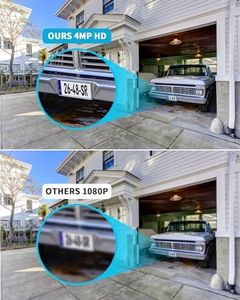
When choosing a Hikvision IP camera, it's important to consider several key specifications to ensure you select the right model for your needs. IP cameras are used for surveillance and security, so understanding the features and how they align with your requirements is crucial. Here are the main specifications to consider and how to navigate them.ResolutionResolution refers to the clarity and detail of the video captured by the camera. Higher resolution means more detailed images. Common resolutions include 720p (HD), 1080p (Full HD), 4MP, 5MP, and 4K. For general home use, 1080p is usually sufficient. For more detailed surveillance, such as identifying faces or license plates, higher resolutions like 4MP or 4K are better. Choose based on the level of detail you need.
Field of View (FOV)Field of View is the extent of the observable area a camera can capture. It is measured in degrees. A wider FOV (e.g., 90-120 degrees) covers more area, which is useful for monitoring large spaces. A narrower FOV (e.g., 60-80 degrees) focuses on a smaller area, providing more detail. Consider the size of the area you need to monitor when choosing the FOV.
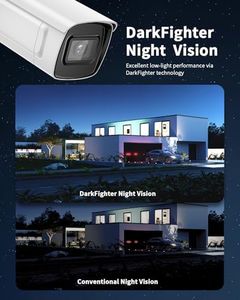
Night VisionNight Vision allows the camera to capture video in low light or complete darkness using infrared LEDs. The effectiveness of night vision is measured by the range it can cover, typically in meters. For outdoor or poorly lit areas, a longer range (e.g., 30 meters or more) is beneficial. For indoor use, a shorter range (e.g., 10-20 meters) may suffice. Assess the lighting conditions of the area to determine the necessary night vision range.
Weather ResistanceWeather Resistance indicates how well the camera can withstand outdoor conditions. This is usually denoted by an IP (Ingress Protection) rating, such as IP66 or IP67. Higher numbers indicate better protection against dust and water. For outdoor use, choose a camera with a high IP rating to ensure durability in various weather conditions. For indoor use, weather resistance is less critical.
Power SupplyPower Supply options for IP cameras include Power over Ethernet (PoE) and traditional power adapters. PoE allows the camera to receive power and data through a single Ethernet cable, simplifying installation and reducing cable clutter. Traditional power adapters require a separate power source. If you have a PoE-compatible network, PoE cameras are more convenient. Otherwise, ensure you have access to power outlets for traditional power adapters.
Storage OptionsStorage Options refer to how the camera stores recorded footage. Common options include local storage (SD cards), network-attached storage (NAS), and cloud storage. Local storage is easy to set up but limited in capacity. NAS provides more storage but requires additional hardware. Cloud storage offers remote access and scalability but may involve subscription fees. Choose based on your storage needs and whether you prefer local or remote access to footage.
Smart FeaturesSmart Features include motion detection, facial recognition, and integration with smart home systems. Motion detection alerts you to movement in the camera's view, while facial recognition can identify specific individuals. Integration with smart home systems allows for automation and remote control. Consider which features are important for your security needs. For example, motion detection is useful for general monitoring, while facial recognition is beneficial for high-security areas.